
Guide to Identifying Codes on your LuminAIDUpdated 3 months ago
On the back of your LuminAID lantern, there should be some fine print. If you have our Solar String Light, the code will be at the top of the product. This is where you'll find the Batch Code and Date Code of your LuminAID. You may be asked to provide this to our Customer Support team as part of our warranty claim process. This helps us verify that you have an authentic LuminAID product, and identifies the unit so that we can better track QC issues.
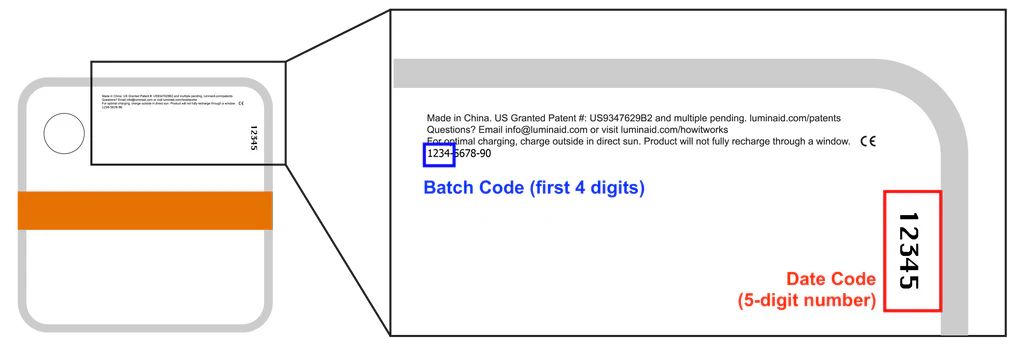
Finding the Batch Code
On the bottom of your lantern, the last line of fine print should be a 10-digit number with a series of dashes (ex: 1234-5678-90)
The Batch Code is the first 4 digits (ex: 1234)
Finding the Date Code
On the bottom of your lantern, there should be a 5-digit number printed in larger text near the fine print. This 5-digit number is the Date Code.
Having trouble? Not all products have will both numbers.
Feel free to provide what you can find, or simply send our customer service a photo of the bottom of your lantern, and our team can record the numbers for you.